

By Ashish Akotkar · 1 September 2026
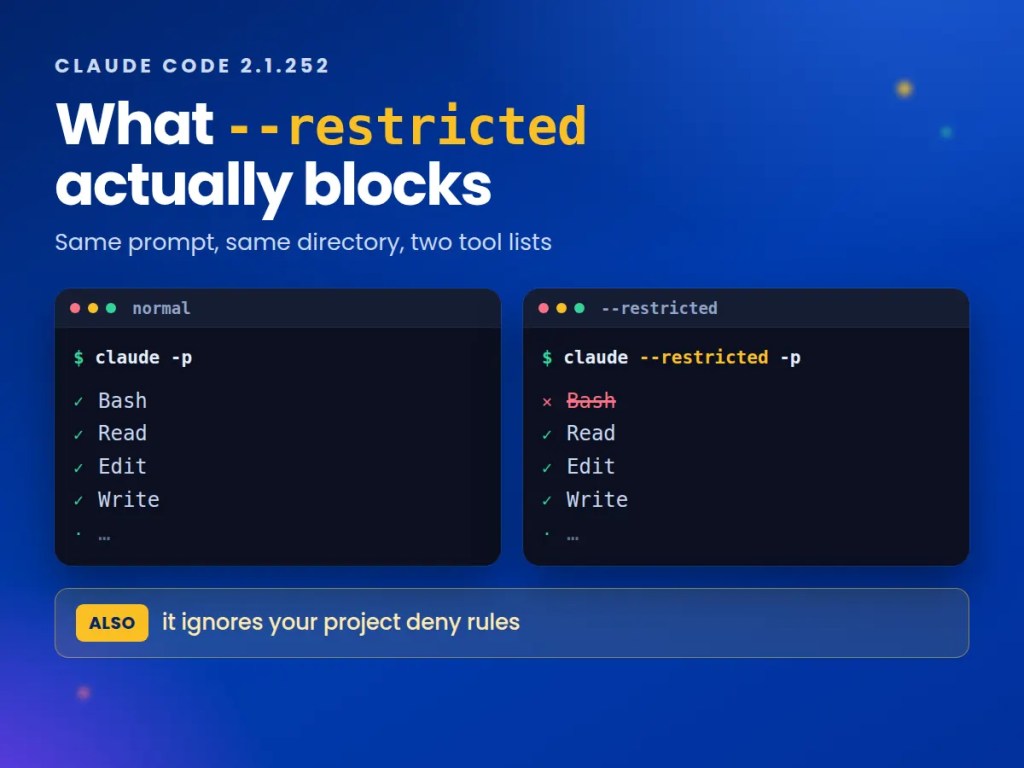
Claude Code shipped a --restricted flag in v2.1.248 and it does what the name suggests: no Bash, no code execution, no WebFetch. If you run agents on machines you don’t fully control, that is a genuinely useful switch, and it is the first Claude Code flag aimed squarely at people running the tool inside someone else’s environment.
It is also not a strict tightening of whatever you already had. Restricted mode ignores your project and user settings files — and that includes the deny rules in them. I put a deny rule on a file, ran it both ways, and restricted mode read the file that normal mode had refused. That behaviour is documented, but its consequence is easy to miss, and it is the part worth understanding before you reach for the flag.
TL;DR
--restrictedremoves Bash and the other code-running tools, plus WebFetch. Confirmed by enumerating the tool list, not by asking.- It loads only managed settings and
--settings. Your project’s.claude/settings.local.jsonis ignored — including deny rules that were tightening things. --tools "WebFetch,Read"brings named tools back. Thedefaultpreset does not.- File tools are confined to the working directory, and
bypassPermissionsis refused outright with an error. - Requires v2.1.248 or later.
CLAUDE_CODE_RESTRICTED=1does the same thing as the flag.
On this page
- What does
--restrictedactually remove? - Does it really ignore your project settings?
- Can you get WebFetch back?
- What happens if you try to bypass permissions?
- Where does file access stop?
- Should you use it?
What does --restricted actually remove?
The CLI reference describes the flag’s purpose precisely: use it “when an evaluation harness drives claude on a shared machine and Claude Code must not run commands or read that machine’s user and project settings.” It requires v2.1.248 or later.
Rather than take the description on trust, I ran the same prompt twice against Claude Code 2.1.252 — once normally, once restricted — asking it to enumerate its own tools. Normal mode:
$ claude -p "List the exact names of every tool you currently have available,one per line, nothing else."AgentArtifactBashEditListAgentsRead...Write
Restricted mode, same directory, same prompt:
$ claude --restricted -p "List the exact names of every tool you currently haveavailable, one per line, nothing else."AgentArtifactEditGlobGrepRead...Write
Bash is gone. So is WebFetch, which was not in the baseline list for this session either but stays absent under every restricted configuration I tried. Ask it to run something and it declines for the honest reason:
$ claude --restricted -p "Run the shell command 'whoami' and tell me the output.If you cannot, say exactly why in one sentence."I can't run shell commands like `whoami` because I don't have access to ashell/bash execution tool in this environment.
The environment variable CLAUDE_CODE_RESTRICTED=1 produces the same result as the flag, which matters if you are setting this in a CI config rather than a command line.
One methodological note, because it cost me a wrong conclusion before I caught it. Asking the model “do you have a Bash tool, yes or no?” is not a reliable test — in one run it answered “Bash=yes” in a session where enumerating the list showed no Bash at all. The model’s self-report about its own tooling is a guess; the enumerated list is evidence. If you are verifying a restriction, enumerate.
Does it really ignore your project settings?
Yes — and this is the part to think about before you reach for the flag.
Restricted mode loads only managed settings and anything passed via --settings. User, project and local settings files are skipped. The reasoning is sound: if you are running an agent on a machine you don’t trust, you don’t want that machine’s config steering it.
But settings files hold deny rules too, and those get discarded with everything else. I tested it directly. In a scratch directory I created a file and a project settings file that denies reading it:
$ echo "hello from a file" > note.txt$ cat .claude/settings.local.json{ "permissions": { "deny": ["Read(./note.txt)"] } }
Normal mode respects the rule:
$ claude -p "Read the file note.txt and print its contents verbatim.If you are blocked, say BLOCKED and why."BLOCKED: I can't read /tmp/rmtest/note.txt — the directory is denied bypermission settings, and the Read tool returned a permission error beforeI could see its contents.
Restricted mode, same directory, same deny rule still on disk:
$ claude --restricted -p "Read the file note.txt and print its contents verbatim.If you are blocked, say BLOCKED and why."hello from a file
I reran this to be sure; the result held both times. So --restricted is not a superset of your existing restrictions. It swaps one set of rules for another. If your deny rules are the thing keeping Claude away from .env, a credentials directory or a vendored secret, adding --restricted on top removes them unless those rules live in managed settings or you pass them explicitly with --settings.
That is worth saying plainly because the flag reads like a safety net you can always add. It is closer to a different profile you switch into — and the working-directory confinement described below is what actually does the containing.
Can you get WebFetch back?
Yes, by naming it. The docs are specific that this works through individual tool names and “not through the default preset”:
$ claude --restricted --tools "WebFetch,Read" -p "List the exact names of everytool you currently have available, one per line, nothing else."ReadWebFetch
Note what happened there: --tools did not add WebFetch to the restricted set, it replaced the set entirely. Two tools named, two tools available — Edit, Glob, Grep and Write all disappeared. If you want a working file-editing session plus WebFetch, you have to name every tool you need.
I also checked whether --tools default quietly hands Bash back, since that would be a meaningful hole. It does not: enumerating the tool list under --restricted --tools default showed no Bash across repeated runs. The documentation is accurate here.
What happens if you try to bypass permissions?
It refuses, at startup, rather than silently ignoring the request. Both routes to bypassPermissions produce the same error:
$ claude --restricted --allow-dangerously-skip-permissions -p "say ok"Error: bypassPermissions not supported in restricted mode$ claude --restricted --permission-mode bypassPermissions -p "say ok"Error: bypassPermissions not supported in restricted mode
A hard failure is the right call — a flag combination that silently downgraded to something weaker would be worse than one that stops. The docs also state that restricted sessions refuse to create cloud sessions; I could not verify that one non-interactively, because --cloud rejects --print before restricted mode gets a say, so treat that as documented rather than tested here.
Where does file access stop?
At the working directories, including anything added with --add-dir. Reading outside them fails with a specific message rather than a generic permission prompt:
$ claude --restricted -p "Read the file /tmp/outside.txt and print its contentsverbatim. If blocked, say BLOCKED and why."BLOCKED — the Read tool refused with: "/tmp/outside.txt is outside /tmp/rmtest;--restricted confines the file tools to the working directory."
This is the containment that survives the settings problem above. Even with your deny rules discarded, the blast radius is the directory you started in. That is a meaningful guarantee for the harness-on-a-shared-machine case the flag was built for — and it is why the answer to “is --restricted safe?” depends entirely on what is inside your working directory.
Should you use it?
For the case it was designed for — automated harnesses, shared or untrusted machines, evaluation runs where Claude Code should read and reason but never execute — it is a single flag that replaces a pile of careful configuration, and it fails loudly rather than quietly. That is a good trade.
For hardening an existing interactive setup, it is the wrong instrument. You would be discarding the permission rules you already tuned in exchange for a coarser profile. If your goal is “Claude should never touch these paths,” deny rules in managed settings keep working across every mode, and sandboxing addresses execution risk without removing the tools.
It also sits at the opposite end of the same dial as the change from a fortnight earlier, when auto mode became the default permission mode and a classifier started approving actions instead of you. Auto mode removes friction; restricted mode removes capability. Both are defaults-and-flags questions worth knowing the shape of before they surprise you — much like what Claude’s memory stores by default.
Before you turn it on
- Check your version —
claude --versionmust be 2.1.248 or later. - Find every
denyrule you rely on and confirm where it lives. If it is in a user, project or local settings file, restricted mode will not read it. - Move the rules that matter into managed settings, or pass them with
--settings. - Look at what is actually in your working directory, because that is the real boundary.
- If you need WebFetch or a specific tool back, name it and every other tool you need in
--tools— it replaces the set rather than extending it. - Add
--strict-mcp-configif you also want MCP servers skipped. - Verify by enumerating the tool list, not by asking the model whether a tool is present.
Tested against Claude Code 2.1.252 on 1 September 2026.





Leave a comment