


A reverse engineer pulled apart Microsoft Paint last week and found something most people assumed wasn’t there: every image Paint generates with AI carries an invisible identifier baked into the pixels themselves — and that identifier is handed out by a Microsoft server that has already seen your prompt. The finding hit Hacker News and then The Register, and within a day the internet had rounded it off to “Windows is watermarking your images.” That version isn’t right. The real version is narrower, more technical, and in one specific way more uncomfortable than the headline.
The short version
- Paint does not watermark every image you open or edit. It watermarks output from its AI features — Cocreator, Image Creator, and Photos’ Image Creator and Restyle.
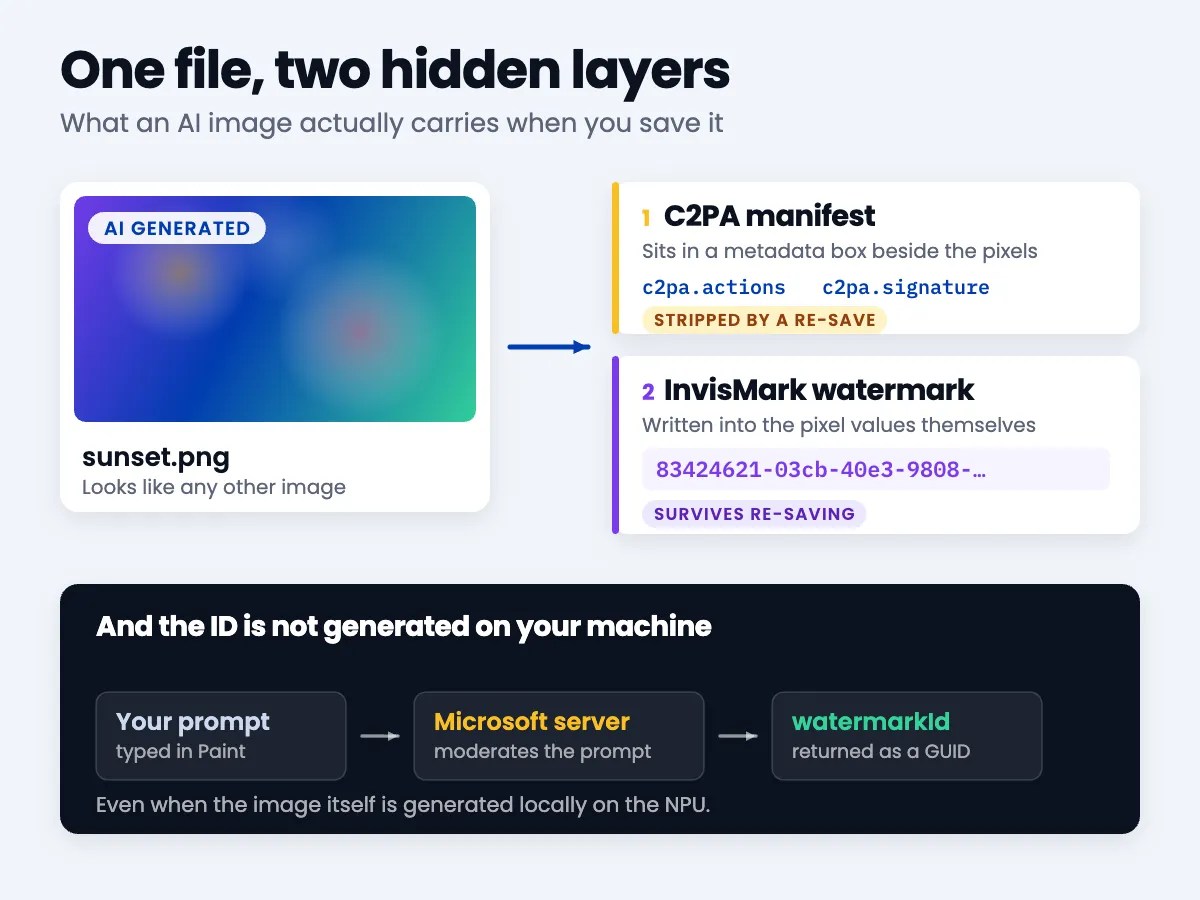
- The identifier is a GUID issued by Microsoft’s prompt-moderation server, returned in the same response that moderates what you typed.
- There are two separate layers: a C2PA metadata manifest (easy to strip, easy to read) and an invisible watermark in the pixels (hard to strip, hard to read).
- You can check the metadata layer on any file in about ten seconds with a free tool. You cannot read the pixel layer without the vendor’s detector.
- This is not unique to Microsoft. Anthropic started watermarking Claude output on 11 August 2026 to comply with the EU AI Act.
What did the researcher actually find?
Xusheng Li went looking inside Paint’s local model files and noticed something odd: a Watermarker.dll weighing 1.67 MB, which is a lot of code for a component nobody had documented. Tracing the call stack backwards from a function called WmkWriteWatermark() led to the answer — the value being written into the image didn’t come from Paint at all. It came down the wire.
When you type a prompt into Paint’s AI features, Paint sends it to a Microsoft moderation endpoint before generating anything. The response carries three things back: a revised version of your prompt, a promptGenerationId, and a watermarkId. That last one is a GUID, and it is what gets written into your image.
The embedding itself uses a technique Microsoft calls InvisMark. The payload is small — a marker byte, the sixteen bytes of the GUID, and a checksum, expanded across 144 bits — but it is spread widely. In one test image, roughly 193,000 of 262,000 pixels were modified to carry it. You cannot see any of this. That’s the point of it.
So does Paint watermark everything you make?
No — and this is the part that got mangled in the retelling. The headline that travelled said Paint watermarks “even locally generated” images, which people reasonably read as “even images I made myself, offline, with a mouse.” What it actually meant was narrower: even when generation runs locally on a Copilot+ PC’s NPU rather than in the cloud, the watermark is still applied, because the GUID was fetched from the server during the moderation step regardless.
The affected features are Paint’s Cocreator and Image Creator, and Photos’ Image Creator and Restyle Image. Drawing a stick figure by hand and saving it as a PNG does not get you a GUID. A commenter in the Hacker News thread made this correction early and it mostly got buried under the alarm.
Which leaves the genuinely awkward bit intact. Nobody is claiming Microsoft tracks your hand-drawn doodles. The concern is that a persistent, unique identifier is embedded in AI output, and that identifier was minted by a server in the same transaction that logged your prompt. Whether those two things are ever joined up is a question about Microsoft’s data retention, not about the technology — and Microsoft did not respond to The Register‘s request for comment before publication. Several people reached for the obvious historical comparison: the near-invisible yellow dots colour laser printers have quietly added to every page for decades.
What’s the difference between the metadata and the watermark?
Most coverage of this treats “watermark” and “Content Credentials” as one thing. They aren’t, and the distinction is the single most useful thing to understand here, because it determines what you can actually check.
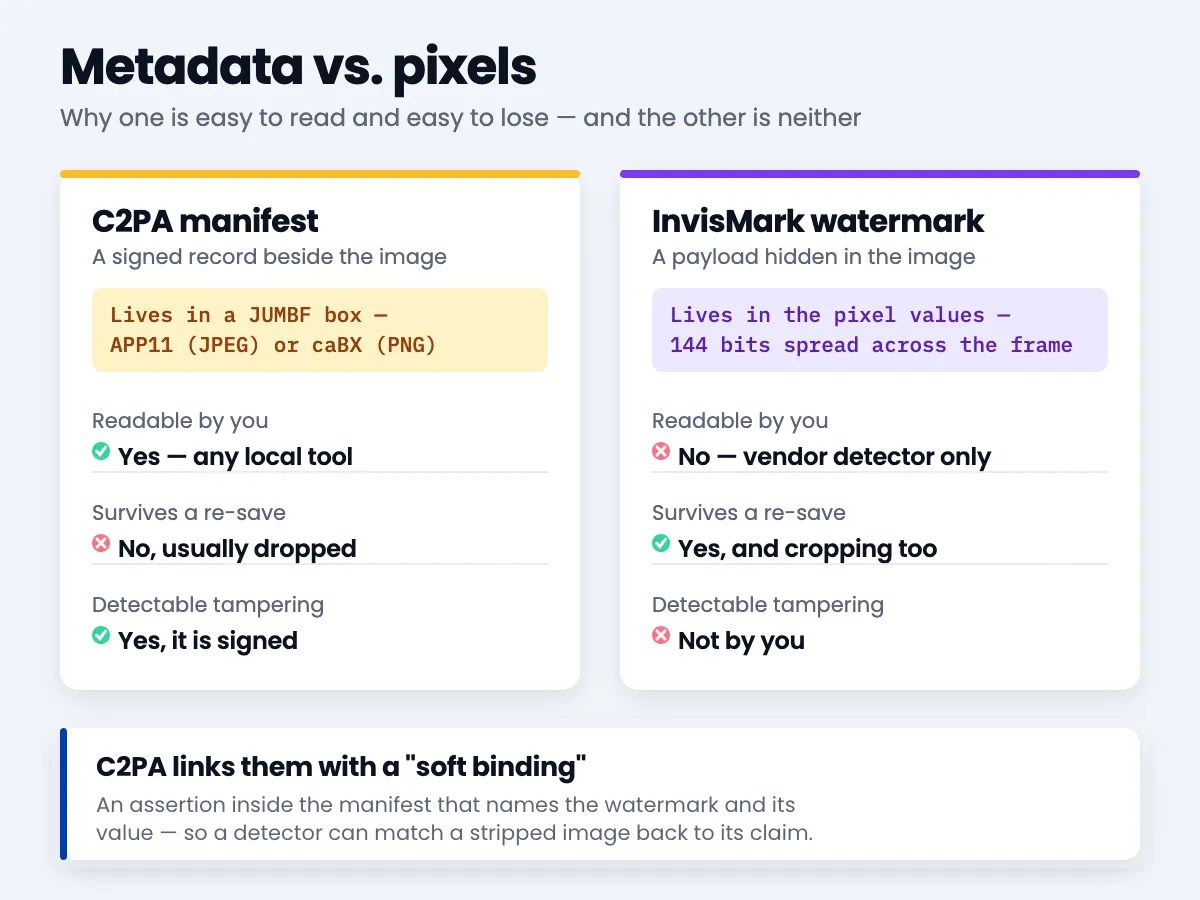
The C2PA manifest is structured metadata attached alongside the image data — in a JUMBF box, in an APP11 segment for JPEGs or a caBX chunk for PNGs. It records who made the file, with what software, and what was done to it. It is cryptographically signed, so tampering with it is detectable. But it is also just metadata: re-save the file through almost any tool that doesn’t understand C2PA and the whole manifest is gone. Not removed maliciously — simply not carried forward.
The InvisMark watermark lives in the pixel values. It survives being re-saved, re-compressed, cropped and converted, because there is no separate metadata block to drop — the payload is the image. That durability is exactly why provenance schemes use both: the metadata carries the readable detail, and the pixel watermark is the part that’s meant to survive the trip through a screenshot and three social networks.
C2PA ties them together with a “soft binding” — an assertion inside the manifest that names the watermark and its value, so a detector can match a stripped image back to its original claim. In the Paint case, that is where the GUID surfaces in readable form.
How do you check a file yourself?
There are plenty of web-based Content Credentials checkers, and they’re fine. But uploading a file you’re suspicious about to a third party to find out what’s in it has an obvious circularity to it, and the browser tools tend to show you a tidy summary rather than what’s actually on disk. ExifTool reads the raw structure and runs locally.
I ran the following against the official C2PA reference test files on ExifTool 12.76. One caveat up front, because it matters: I don’t have a Copilot+ PC, so I could not test Paint’s output directly. What I can show you is what the format looks like when you inspect it, which is the part that transfers to any file you’re handed.
The fastest possible test — does this file carry Content Credentials at all?
$ exiftool -G1 -a -s image.jpg | grep -c JUMBFOn a plain JPEG I generated myself, that returns 0. On the C2PA reference file it returns 27. That’s the whole test — zero means no manifest, anything else means there’s a provenance record to read.
To see what the manifest actually claims:
$ exiftool -a -G1 -s image.jpg | grep JUMDLabel | sed 's/.*: //' | sort -u

c2pa
c2pa.actions
c2pa.assertions
c2pa.claim
c2pa.hash.data
c2pa.ingredient
c2pa.signature
c2pa.thumbnail.claim.jpeg
c2pa.thumbnail.ingredient.jpeg
contentauth:urn:uuid:c2677d4b-0a93-4444-876f-ed2f2d40b8cf
stds.schema-org.CreativeWork
Every line is a labelled assertion. c2pa.actions is the edit history, c2pa.ingredient means this file was built from another file, c2pa.signature is the cryptographic signature over the claim, and the urn:uuid is this manifest’s unique ID. In that specific file the recorded actions were c2pa.opened and c2pa.color_adjustments, and the claim generator identified itself as make_test_images/0.33.1 c2pa-rs/0.33.1. The file is, quite literally, carrying a record of what was done to it and by what.
The label to look for in the Microsoft case is a soft binding. The reference test files don’t have one — grep -ci soft_binding returns 0 — which is a neat illustration of the difference: a C2PA manifest describes provenance, but it only points at a pixel watermark if the generator actually embedded one and said so.
What does the check actually tell you — and what doesn’t it?
Worth being clear about the limits, because provenance tooling is routinely oversold.
A manifest that’s present and verifies tells you something real. Absence tells you almost nothing — the file might never have had one, or it might have passed through any ordinary resize or upload that dropped it. “No Content Credentials” is not evidence an image is authentic, and it is not evidence it’s synthetic either. It is the absence of evidence.
The pixel watermark is the opposite problem. It’s durable, but you can’t read it. Detecting InvisMark or Google’s SynthID requires the vendor’s own detector, which means confirming whether an image carries a Microsoft watermark generally involves asking Microsoft. A provenance system that only its issuer can fully inspect is a strange kind of transparency, and it’s a fair criticism of the whole approach — one that sits squarely alongside the other transparency questions AI has made unavoidable.
Should you actually care?
If you use Paint’s AI features to make a birthday card, this is trivia. If you generate images in a context where being linked back to your prompt would matter — journalism, activism, anything competitive, anything you’d rather not have traced to your account — then a unique server-issued ID travelling inside the file is worth knowing about, and it’s worth knowing that stripping the metadata doesn’t remove it.
What’s genuinely new here isn’t watermarking. Provenance marking of AI output is spreading fast, it’s largely being driven by regulation like the EU AI Act, and on balance it’s a good thing — being able to establish where an image came from is a real problem worth solving. What’s new is the detail that the identifier is unique per generation and minted server-side, which converts a content-authenticity feature into something with the shape of a tracking identifier. Those can be the same bytes. They are not the same intent, and users were told about one and not the other.
A few things worth doing:
- Run the one-line JUMBF check on any image whose origin you’re relying on, before you rely on it.
- Read a present manifest properly rather than trusting a green tick — the
c2pa.actionsassertion often says more than the summary does. - Treat a missing manifest as no information, not as a clean bill of health.
- Assume anything generated by a commercial AI image tool carries some identifier, whether or not the interface mentions it.
- Remember that the pixel layer isn’t removed by re-saving, and that vendors are the only ones who can read it.
This is the same shape as most AI features that arrive looking convenient: the useful thing and the uncomfortable thing are the same mechanism, and the only real defence is knowing which is which before you agree to it. Much like handing an assistant access to your Messages — worth doing with your eyes open.




Leave a Reply